

Valheim Mods
File Janitor
File Janitor keeps Valheim's BepInEx folder clean: it removes files left behind by uninstalled mods and keeps every mod's config current, backing up each file first.

Video
Screenshots


What It Does
Removed mods leave nothing behind
At every launch, before any mod loads, files of removed mods it has seen move to its backup; mods disabled by a mod manager still count as installed.
Unclaimed files are listed
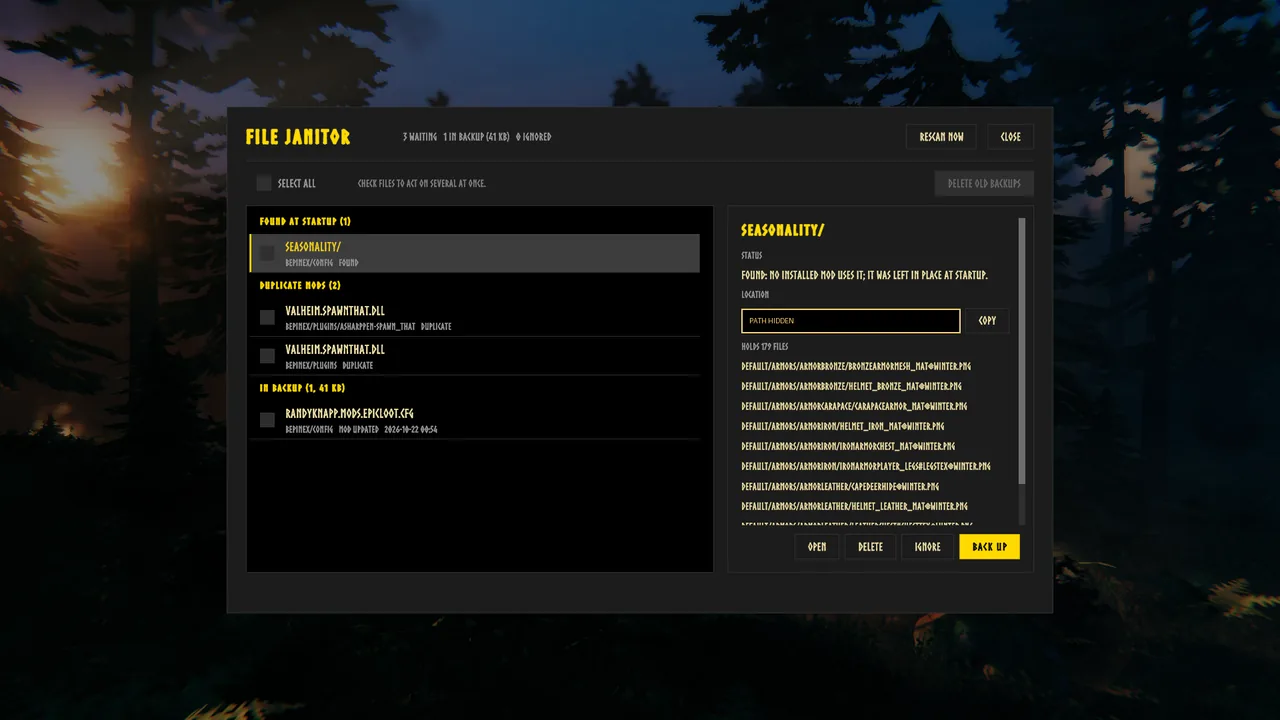
A file no installed mod uses shows under Found at Startup, to delete, back up or ignore; turn on Move Unclaimed Files to back these up automatically.
Fresh configs after updates
When a mod's version changes, its config is backed up and the mod writes a new one on that launch, with every setting that still exists carried over.
Update report
For a config refreshed after an update, the menu shows which settings were carried over, which were dropped and which are new in that version.
Stale settings
Once you have played a world with it installed, settings no installed mod has read since are listed per config; Clean Up backs the config up, then removes them.
Duplicate mods
A plugin installed twice, or the same dll in two folders, is flagged at every copy so you can delete or back up the extra one.
Cache cleanup
Each folder and file in BepInEx\cache, except BepInEx's own, is listed with its size, ready to delete; its mod rebuilds what it needs.
Everything is backed up
Every file it moves or replaces goes to BepInEx\FileJanitor\Backups, Restore in its menu puts one back where it was, and anything you delete from its menu goes to the Recycle Bin.
One menu for all of it
The File Janitor button on the main menu, or Ctrl+F1 there, lists everything found, backed up or kept, and acts on one file or several checked at once.
Waiting count
The button shows how many files are waiting for you, for example File Janitor (3).
Rescan Now
Checks the BepInEx folder again from the menu without restarting Valheim; it lists what it finds and moves nothing.
Ignore and Never Touch
Ignore any found file, duplicate, stale config or cache, and take it back from the Ignored group; paths listed in Never Touch are left alone.
Backup housekeeping
The menu shows how much space the backups take; Delete Backups After Days or Delete Old Backups sends older ones to the Recycle Bin.
Update notice
Once per game start it asks alkeari.com for its newest version and says so in the top left corner only when a newer one is out. Nothing else is sent; Update Notice turns it off.
Install
Requirements
- BepInExPack for Valheim.
- Verified on Valheim 1.0.20.
Installation
- Install BepInExPack for Valheim first.
- Extract the downloaded zip into Valheim's game folder, so that it holds
BepInEx\plugins\FileJanitor\FileJanitor.dllandBepInEx\patchers\FileJanitor\FileJanitor.Preloader.dll.
To update, extract the new zip over the old one.
Configuration
Every behavior can be switched or tuned in BepInEx\config\alkeari.valheim.filejanitor.cfg, or in a configuration manager:
Move Orphans of Removed Mods(on),Move Unclaimed Files(off),Never Touch(empty), for exampleconfig/MyMod.cfg.Refresh Configs After Updates(on).Find Stale Settings,Find Duplicate Mods,List Caches(all on),Read Settings Check Seconds(60).Delete Backups After Days(0, never).Show Main Menu Button,Show Waiting Count(both on),Folder Preview Lines(10),Scroll Rows Per Wheel Notch(3),Open Menu(Ctrl+F1).Log Each File(on).Update Notice(on),Update Notice Delay Seconds(10),Update Notice Text.
Changelog
v1.0.0
- Added Files left behind by uninstalled mods move to a backup at every launch, before any mod loads.
- Added Files no installed mod uses are listed to delete, back up or ignore, or backed up automatically with Move Unclaimed Files.
- Added A mod's config is backed up and written fresh after the mod updates, with every setting that still exists carried over, and the menu reports what was kept, dropped and new.
- Added Settings no installed mod reads any more are listed per config and can be removed after a backup.
- Added Duplicate mod installs are flagged at every copy, and BepInEx cache folders are listed with their size, ready to delete.
- Added A File Janitor menu on the main menu (Ctrl+F1) lists everything found, backed up or kept, with Rescan Now, a waiting count on its button, and actions on one file or several.
- Added Ignore, Never Touch and backup clean-up settings, with every file deleted from the menu sent to the Recycle Bin.
- Added A notice in the top left corner when a newer version is out, which Update Notice turns off.
Send Feedback
Bugs, ideas, praise and questions about File Janitor go straight to Alkeari from here, with no account needed.
Valheim
More for Valheim
 MultiCraft for SeneaL UIMultiCraft for SeneaL UI lets MultiCraft and SeneaL UI's crafting window work together, so a chosen amount crafts as one batch with one timer.
 SmartCraftStorage for SeneaL UISmartCraftStorage for SeneaL UI makes SeneaL UI's crafting window show the materials SmartCraftStorage finds in nearby chests.