

Age of Wonders 4 Mods
Mod Configuration Menu
AoW4 Fix Kit, the optional download that saves setup settings with each realm and stops the multiplayer save error large mod lists cause, plus every mod's settings in one Mod Config tab.

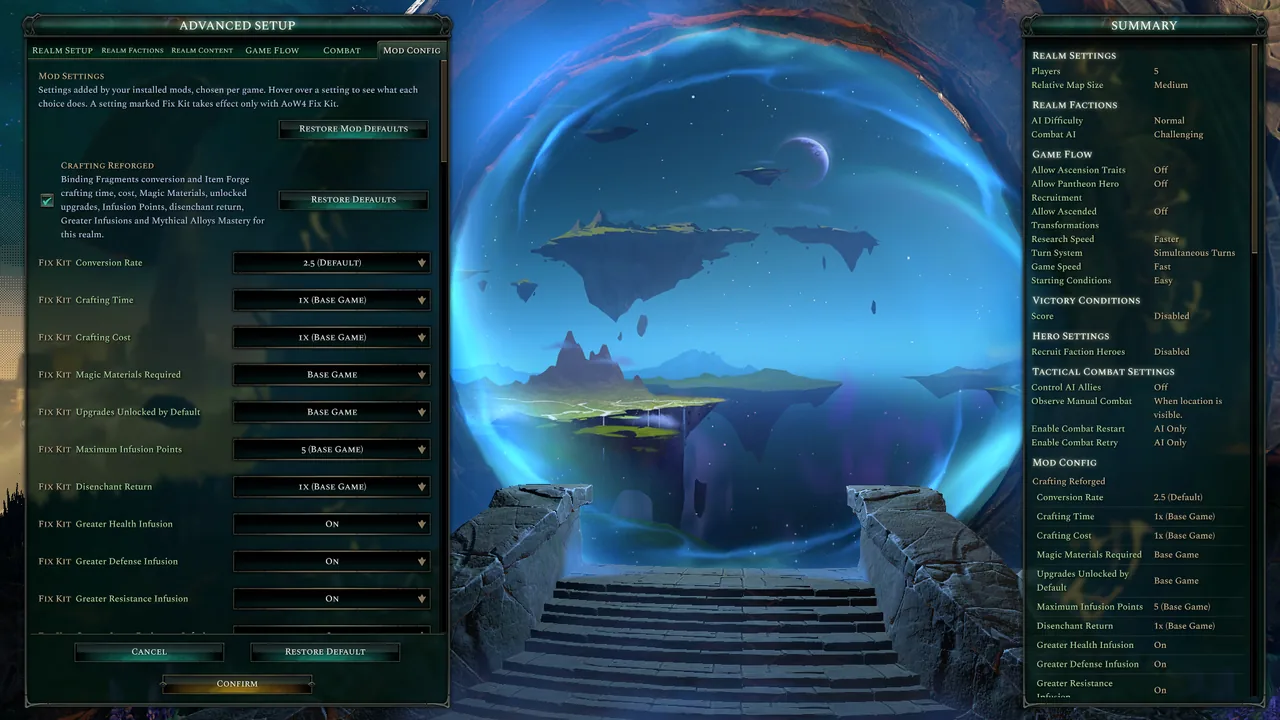
Screenshots


What It Does
AoW4 Fix Kit, the optional companion and the bigger half of this mod, is a Windows program Steam starts with the game: it saves every setup setting with each custom realm, stops the multiplayer save error large mod lists cause, and has mods apply their settings per game in your language.
- Where to get it - only on Nexus Mods, since Steam Workshop and Paradox Mods cannot carry a program: https://www.nexusmods.com/ageofwonders4/mods/136
Mod Configuration Menu itself:
- A Mod Config tab - the advanced world setup gains a sixth tab, Mod Config, after Combat, styled like the others.
- Mod settings in one place - every setting a mod adds to the setup is listed there instead of under Narrative Content Filtering.
- Each mod in its own section - supported mods get a header and one dropdown per setting, with the mod's own choices in its own order.
- Always shows what is stored - each dropdown follows its setting when it changes outside the tab, such as through Restore Defaults.
- Restore Mod Defaults - a button on the tab puts every mod setting back to its default and leaves the game's own settings alone.
- Restore one mod - each mod's header has a Restore Defaults button that resets only that mod's settings.
- Changed marks - a setting that is not at its default shows a Changed mark beside its name.
- Fold a mod away - a checkbox beside each mod's header shows or hides that mod's settings.
- Settings that need another - a setting that works only beside another's choice stays disabled, with a Needs mark naming it, such as Heroes Reforged's Greater Signature Skills until a fifth or sixth signature skill pick.
- Mod Config in the Summary - every setting of your other mods is listed with its current choice in its own Mod Config section of the Summary.
- The game's own content left alone - Narrative Content Filtering in the Realm Content tab keeps the game's own entries, in every language tested.
Install
Requirements
- Age of Wonders 4, verified on game build 126126.
- No DLC, and no other mod is required to install it.
Installation
- Subscribe on this page.
- In the Paradox Launcher, add Mod Configuration Menu to the playset you play with and press Play.
Configuration
Its own section on the Mod Config tab, chosen per game like every mod setting:
- Changed Marks - Shown (Default) or Hidden.
- Mod Sections Start - Collapsed (Default) or Expanded, how each mod's settings start when the tab opens.
- Per-Mod Restore Buttons - Shown (Default) or Hidden.
Every other setting it shows belongs to your other mods.
Changelog
v1.0.0
- Added A Mod Config tab in the advanced world setup, styled like the game's own tabs, that lists every setting mods add to the setup instead of Narrative Content Filtering.
- Added Supported mods, Crafting Reforged and Heroes Reforged, get their own section with a header and one dropdown per setting, using the mod's own choice names in its own order.
- Added Each dropdown follows its setting when it changes outside the tab, such as through the game's Restore Defaults button.
- Added A Restore Mod Defaults button that resets every mod setting and leaves the game's own settings alone, and a Restore Defaults button in each mod's header that resets only that mod's settings.
- Added A Changed mark beside every mod setting that is not at its default.
- Added A checkbox beside each mod's header that shows or hides that mod's settings, which start hidden.
- Added A setting that does something only beside another setting's choice is disabled, with a Needs mark naming that setting, until the choice is picked.
- Added Changed Marks, Mod Sections Start and Per-Mod Restore Buttons settings in the menu's own section, to hide the marks, start sections expanded instead of collapsed or hide the per-mod buttons.
- Added Every setting of your other mods is listed with its current choice in a Mod Config section of the Summary.
- Added Settings that take effect only with AoW4 Fix Kit carry a Fix Kit mark whose tooltip says so.
- Added Any mod can get its own section by posting its registration, with each setting's label and choices in order, as For Mod Authors.md in the mod folder describes.
- Added AoW4 Fix Kit, an optional download on this mod's Nexus Mods page that saves every setup setting with each custom realm, applies mod settings per game, shows mod text in the language you play in and stops the multiplayer save error that large mod lists cause.
Send Feedback
Bugs, ideas, praise and questions about Mod Configuration Menu go straight to Alkeari from here, with no account needed.