

 Browser Extensions / Browser Extension
Nexus Mods Assistant
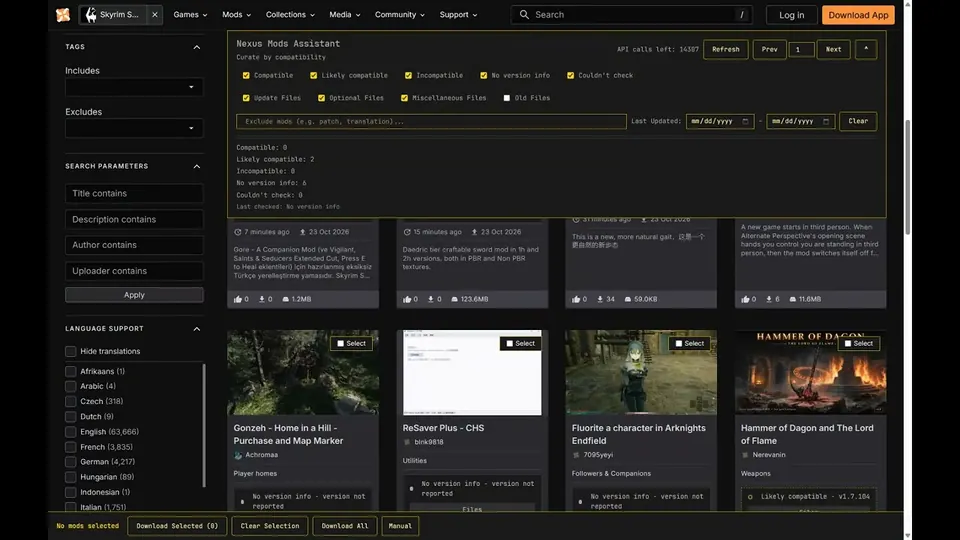
Every mod tile on Nexus Mods shows whether the mod works with the game version you play. Filter a catalog page down to what will run, then download them all in one go instead of one tab at a time.


- Newest
- v3.4.2
- Released
- Oct 14, 2026
- Downloads
- 397
01 / Video
Video
02 / What It Does
What It Does
- A compatibility verdict on every mod tile - and on a mod's own page, beside the title and as a column in its requirements table, each requirement checked on its own.
- Six verdicts Compatible, Likely compatible, Incompatible, No version info, Couldn't check, and Not set up.
- The evidence, in the tooltip what the verdict matched on, and whether the match was exact or inferred.
- Worked out, not looked up Nexus publishes no supported-
version field, so it reads the mod's version, summary, description, changelogs, file names and upload dates.
- Filter the grid down to what will run - a toggle per verdict hides the rest. "Not set up" has no toggle on purpose: a tile the extension has not judged is never hidden by a filter.
- And filter it by everything else - a keyword exclusion box, a Last Updated range, file category toggles, pagination, refresh and a download mode selector. Keywords, dates and collapsed state persist.
- A file list per mod without leaving the page - grouped by Main, Update, Optional, Miscellaneous and Old, each entry showing version, size and upload date. Your selection survives a reload.
- Bulk download - take the mods you ticked, or every tile left after filtering. The button becomes Stop mid-run, though files already started finish.
- Requirements handled before the download, not after it - a mod's requirements are shown with their own verdicts, and you install with them, without them, or skip the mod.
- Two download modes - Manual resolves a direct link through the Nexus API or your logged-in session and hands it to the browser. Vortex emits an
nxm://link for whatever mod manager registered it. - Game version lists are derived, never shipped - built at run time from the publisher's Steam patch notes and branches (through SteamCMD.
net), and the versions authors and collections state on Nexus itself. - Nothing phones home - no telemetry and no analytics. It talks to Nexus Mods, Steam's public endpoints and SteamCMD.
net, with your own key or session, and reads one public file on alkeari.com to spot a new version. - Says when a new version is out - once a day it checks for a newer release and shows a notice only when one exists. You can turn this off.
03 / Install
Install
From Nexus Mods
Requirements
- Chrome, Edge or another Chromium browser at version 102 or later, or Firefox 140 or later.
- A Nexus Mods account, to generate a key and to download anything.
- A Nexus Mods Personal API Key, optional: it is what unlocks the verdicts, file lists, requirement lookups and downloads.
- Vortex or Mod Organizer 2, optional, and only if you use the Vortex download mode.
Without a key you can still enable the extension, set a target game and version, use the filter bar, and target the game whose page you already have open. On Firefox the add-on declares that it handles sign-in data, meaning your API key, which Firefox shows you at install.
Installation
- Click Add to Chrome on the Chrome Web Store listing, or Add to Firefox on the Firefox Add-ons listing.
- Open the extension, set your target game and its version range, and add your Nexus API key if you have one.
- Open any Nexus Mods game's mods page. The filter bar appears above the grid and every tile gets a verdict.
The files on this page are the same builds the browser stores carry. Nexus cannot install a browser extension, so install from one of the stores above and it keeps itself updated.
From Chrome Web Store
Requirements
- Chrome, Edge or another Chromium browser at version 102 or later, or Firefox 140 or later.
- A Nexus Mods account, to generate a key and to download anything.
- A Nexus Mods Personal API Key, optional: it is what unlocks the verdicts, file lists, requirement lookups and downloads.
- Vortex or Mod Organizer 2, optional, and only if you use the Vortex download mode.
Without a key you can still enable the extension, set a target game and version, use the filter bar, and target the game whose page you already have open. On Firefox the add-on declares that it handles sign-in data, meaning your API key, which Firefox shows you at install.
Installation
- Click Add to Chrome at the top of this page. The same build runs in Edge and other Chromium browsers.
- Open the extension, set your target game and its version range, and add your Nexus API key if you have one.
- Open any Nexus Mods game's mods page. The filter bar appears above the grid and every tile gets a verdict.
From Firefox AMO
Requirements
- Chrome, Edge or another Chromium browser at version 102 or later, or Firefox 140 or later.
- A Nexus Mods account, to generate a key and to download anything.
- A Nexus Mods Personal API Key, optional: it is what unlocks the verdicts, file lists, requirement lookups and downloads.
- Vortex or Mod Organizer 2, optional, and only if you use the Vortex download mode.
Without a key you can still enable the extension, set a target game and version, use the filter bar, and target the game whose page you already have open. On Firefox the add-on declares that it handles sign-in data, meaning your API key, which Firefox shows you at install.
Installation
- Click Add to Firefox at the top of this page. Firefox 140 or later.
- Open the extension, set your target game and its version range, and add your Nexus API key if you have one.
- Open any Nexus Mods game's mods page. The filter bar appears above the grid and every tile gets a verdict.
04 / Configuration
Configuration
Everything lives in the popup. There is no separate options page and no keyboard shortcuts, and a change applies at once to every open Nexus mods page.
- Power toggle in the header switches the whole extension off: no bars, no badges, no requests.
- Target game and version range, with an optional end version, plus a one-click suggestion from the page you have open.
- Nexus API key: paste one or press Authorize SSO, then Show, Replace key or Disconnect it.
- Download mode, Manual or Vortex, kept in step with the on-page selector.
- File list toggles for Old, Update, Optional and Miscellaneous, also kept in step with the on-page panel.
- Exclude mods containing, the same keyword list as the on-page box.
- Open the listing with translations excluded, on by default, which adds Nexus's own translation filter when the popup opens a listing and hides translation mods on the page.
- Refresh versions re-fetches build numbers for the selected game and ignores the cache.
- Check for Updates, on by default: once a day it reads the public release list at alkeari.com and shows a notice only when a newer version is out. Nothing else is sent.
- Verbose console logging, off by default, and Clear cached Nexus data, which purges the stored game list and cached responses.
05 / Details
Details
Reach
397
- Nexus Mods222 downloads56%+33 in 30 days
- Chrome Web Store156 users39%+24 in 30 days
- Firefox AMO19 users5%+10 in 30 days
Details
| Version | 3.4.2 |
|---|---|
| Released | Oct 14, 2026 |
| On Nexus Mods | 3.4.2 |
| On Chrome Web Store | 3.4.2 |
| On Firefox AMO | 3.4.2 |
Follow Releases

06 / What Players Say
What Players Say
The Nexus/
Github community appreciates this! Therefore, thank you very much for sharing this practical extension.
Thanks :) I use this to filter by date range and it works great.
07 / Changelog
Changelog
v3.4.2
- Added Every button, box, switch and link in the popup and on Nexus pages has a tooltip saying what it does.
- Changed Text in the popup and on the injected panels uses one set of sizes, and spacing sits on a 4 px grid.
- Changed Animations are quicker, the loading badge no longer pulses, and every animation turns off when your system asks for reduced motion.
- Changed Links in the required mods dialog and the reload notice show the gold focus outline when reached by keyboard.
- Fixed The Download All button keeps its tooltip after a download run ends.
v3.4.1
- Changed The popup's subtitle, the bundled install notes and the privacy policy name the publisher as Alkeari.
- Changed Borders and washes on the injected panels use the palette's own translucent values, so a border no longer reads brighter than the one beside it.
v3.4.0
- Added The extension speaks 21 languages besides English and follows the one your browser is set to: Czech, Danish, Dutch, Finnish, French, German, Hungarian, Italian, Japanese, Korean, Norwegian, Polish, Portuguese (Brazil and Portugal), Russian, Simplified and Traditional Chinese, Spanish, Swedish, Turkish and Ukrainian.
- Changed Nexus's own file category names stay in English in every language, so they still match the headings on the page you are reading them beside.
- Fixed Counts that could be one no longer read "Loaded 1 titles" or "Cleared 1 cached entries".
- Fixed The amount of space freed is now shown when clearing a single cached entry, where it was blank.
v3.3.0
- Changed The popup and the on-page panels have square corners and no drop shadows.
- Changed Borders and fills are solid grays instead of see-through white, so edges read cleanly on any page.
- Changed Text falls back to a monospace font rather than a sans-serif one.
v3.2.9
- Added Compatibility verdicts now show how confident they are and what evidence they were based on
- Added A "likely compatible" verdict, so an inferred match no longer looks like a confirmed one
- Added A "not set up" state, so a fresh install no longer reports every mod as failed
- Changed Version lists are worked out automatically for every game on Nexus Mods, not just a handful, and come out the same on any machine
- Changed The Nexus API key is now optional. Browsing, filtering, and choosing a game and version all work without one
- Changed Versions are listed newest first in true release order, with duplicate and near-
duplicate builds merged - Changed The popup can show, replace or disconnect your API key, and reports how much space clearing the cache reclaimed
- Changed File selections survive a page reload, and download mode is reachable from the popup
- Fixed Compatibility is judged against the game you are viewing, not whichever one was last set in the popup
- Fixed The Update, Optional and Miscellaneous toggles now actually filter the file list
- Fixed Saving your game and version no longer fails silently when browser storage is full
- Fixed Refreshing a page no longer leaves duplicate panels behind, and the panel no longer vanishes for the rest of the session
- Fixed A failed download now says so, and turning the extension off fully stops it and restores the page
- Removed An unused host permission
v3.1.0
- Added Compatibility verdicts gained confidence levels and evidence sources
- Changed The Nexus API key became optional
- Fixed Compatibility is judged against the game on screen, not the last one set
- Fixed Settings no longer break when browser storage is full
08 / Send Feedback